The Yealink AVHub is a dedicated audio and video processor developed for large meeting spaces and professional conferencing environments. Designed to enhance overall PC performance, it supports integration with multiple cameras, microphones and speaker systems. Devices connect via Ethernet with Power over Ethernet, streamlining installation and centralising system management. The AVHub enables users to configure and control camera layouts in real time using the Yealink plugin for Microsoft Teams Rooms. It supports advanced features such as multi-camera IntelliFocus, divisible room setups and BYOD scenarios. With built-in AI processing capabilities, Yealink AVHub facilitates simultaneous multi-camera use, offering dynamic views and flexible tracking modes to suit varied meeting formats. Remote participants can view customised video layouts, improving visibility and engagement across distributed teams. By managing audio and video processing directly, the Yealink AVHub reduces load on the core computing unit, increasing system efficiency and scalability for future conferencing needs including Microsoft Teams Together Mode.
Category: Room System Accessories
-
RCH40
The Yealink RCH40 Room Cable Hub is a compact Gigabit PoE Plus switch engineered for professional meeting room audio and video networking. Featuring four 10/100/1000 Mbps Ethernet downlink ports and a single uplink port, the Yealink RCH40 provides stable connectivity and complies with IEEE 802.3af and 802.3at standards. Each port supports up to 30 watts of power output, with a total PoE power budget of up to 90 watts, making it well suited for powering and linking conferencing peripherals such as cameras, microphones, and touch panels. Designed with power prioritisation capabilities, the Yealink RCH40 ensures critical devices receive the necessary power in multi-endpoint environments. This reliable and space-efficient switch supports simplified deployment in enterprise collaboration spaces, offering a practical networking solution for integrators and IT teams seeking structured and scalable meeting room infrastructure.
-
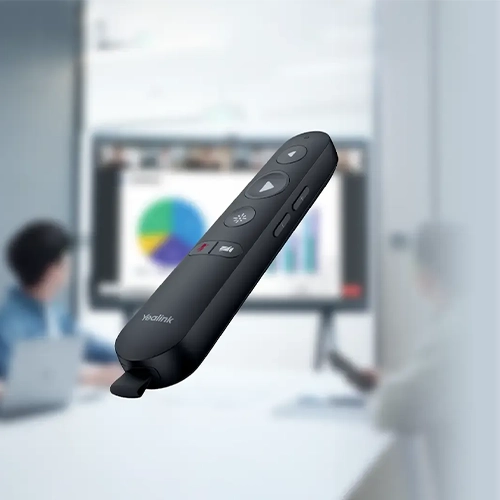
MB-Remote
The Yealink MB-Remote offers precise and reliable control for the MeetingBoard Series, enabling presenters to manage meetings with confidence and accuracy. Purpose-built for use with Yealink conference systems, the MB-Remote simplifies navigation during presentations, supporting clear communication and smooth interaction with participants. Its integrated functions include multimedia page control, air mouse capability, and other essential meeting tools that support varied presentation styles. Pre-paired with its receiver during manufacturing, the MB-Remote requires no additional setup. Users can simply connect the receiver to the host device to begin using the remote immediately. Designed for business environments where clarity and control are essential, the Yealink MB-Remote enhances presentation delivery and ensures consistent operational performance. Ideal for corporate meeting rooms and professional collaboration spaces, this remote helps maintain flow and focus throughout every session.
-
YPS20
The Yealink YPS20 Partition Sensor is a smart detection solution designed for adaptable meeting environments. This compact sensor automatically identifies room divisions, removing the need for manual adjustments when reconfiguring conference spaces. Featuring a reliable infrared-based sensing range of 1.5 metres and supported by a 10-metre cable, the YPS20 ensures accurate detection and straightforward installation in diverse room layouts. Its infrared technology helps reduce false triggers, promoting consistent performance in professional settings. Engineered for integration with the Yealink AP08 and Room Controller, the YPS20 enhances system responsiveness by enabling automatic adjustments to connected devices based on the room’s partition status. The sensor’s discreet design allows it to blend seamlessly into modern meeting rooms while maintaining high operational standards. Optimised for corporate and institutional use, the Yealink YPS20 supports intelligent workspace management by enabling dynamic configuration changes without manual intervention, ensuring a more efficient and adaptable meeting experience.
-
ETV-65
The ETV 65 is designed to function as a high-performance companion display for the MeetingBoard 65, enabling a dual-screen environment that supports enhanced interaction in professional settings. When connected, the ETV 65 operates as an external display with full touch support, allowing users to navigate and collaborate directly on-screen. Its 65-inch 4K Ultra HD panel delivers visuals at 60Hz, while the zero-gap bonding technology improves image clarity and touch precision. With a low writing latency of 40 milliseconds and support for up to 20 simultaneous touch points, the ETV 65 promotes efficient collaboration in meetings, presentations, and digital workflows. This display integrates effectively into existing conferencing systems, providing added flexibility for enterprise and education users. The ETV 65 is ideal for organisations looking to expand their interactive display capabilities without compromising on quality or performance.
-
ETV-86
The ETV86 is designed to function as an external display when paired with the MeetingBoard 86, offering a professional dual-screen configuration ideal for collaborative business environments. Featuring full support for touch interaction, the ETV86 enhances user engagement and contributes to improved meeting productivity. This display delivers exceptional visual performance with its 4K resolution at 60Hz, ensuring clear and detailed imagery suitable for high-level presentations and interactive sessions. Its zero-gap bonding screen reduces reflections and increases display accuracy, while the writing latency of just 40 milliseconds provides a responsive and natural writing experience. With support for up to 20 simultaneous touch points, the ETV86 enables multi-user collaboration, making it a practical addition to any modern meeting space or conference room. The ETV86 integrates easily into existing setups, making it a reliable choice for organisations seeking a robust and interactive visual solution.
-
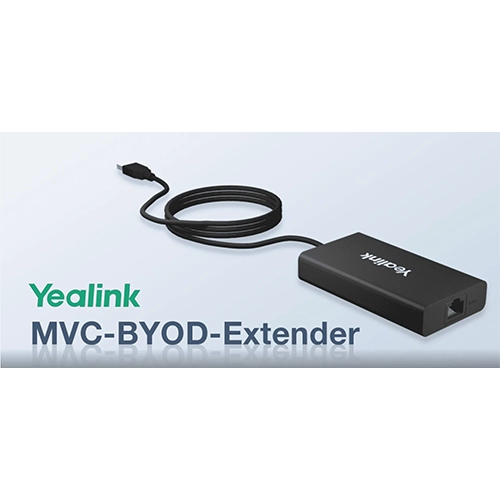
MVC-BYOD-Extender
The Yealink MVC BYOD Extender enables efficient switching between Microsoft Teams Rooms and a variety of unified communications platforms, offering flexibility for diverse meeting environments. Designed for bring your own device (BYOD) scenarios, this solution allows users to connect their personal laptops via a single USB cable and initiate video meetings with minimal setup. The Yealink MVC BYOD Extender enhances the meeting room experience by supporting high-quality audio and video through dedicated hardware components. Users benefit from intuitive meeting control via the MTouch II touch panel and can share content wirelessly using the Yealink WPP20 presentation pod. Ideal for businesses seeking to maximise their existing meeting room investments, the Yealink MVC BYOD Extender ensures consistent collaboration across multiple platforms. Its practical design and professional-grade performance make it a valuable addition to modern conference room solutions, particularly for organisations adopting flexible communication strategies.
-
VCH51
The Yealink Sharing Box VCH51 offers a practical solution for content sharing during meetings, enabling users to easily connect their PC to a compatible Yealink video conferencing system. Designed for straightforward deployment and administration, the VCH51 ensures reliable transmission of presentations with consistent audio and visual quality. It supports BYOD functionality, allowing participants to use their own devices with select Yealink endpoints, including the MeetingBar A20 and A30, as well as the MeetingEye 400 and 600. In BYOD mode, users can configure the Yealink system as their PC’s audio and video interface, enhancing the overall conferencing experience. The VCH51 supports HDMI sharing and is compatible with a wide range of Windows operating systems from version 7 upwards, along with macOS 10.6 or later. It functions with most standard PC applications, making it a versatile addition to professional meeting environments that require dependable connectivity and device compatibility.
-
MShare E2
The Yealink MShare E2 MVC Screen Sharing Box is designed to support flexible meeting room deployments, offering a practical solution for professional conferencing environments. Independent from the Touch Console, the MShare E2 facilitates adaptable installation across varied room configurations. Its compact form factor enables discreet placement, including integration within conference tables, enhancing cable management and room aesthetics. The device includes three essential ports – USB-Type B, HDMI In and USB-C – providing broad compatibility with multiple device types. An integrated LED bi-colour light clearly displays the casting status of the auxiliary stream, assisting users in monitoring active connections. By operating independently of the MTouch Console casting cable, the Yealink MShare E2 ensures reliable performance in setups where extended reach or alternative positioning is required. This unit is particularly effective in environments using HDMI matrix systems, offering both functional and visual alignment with modern meeting room infrastructure.
-
MShare
The Yealink MShare is a dedicated screen sharing unit designed for professional content presentation. Equipped with both HDMI and Mini DisplayPort inputs, it enables users to share content directly from their Windows laptops or MacBooks. When paired with the Yealink WPP20 wireless presentation pod, the MShare supports cable-free sharing with a single click, eliminating the need for network configuration or additional routers. With support for full HD 1080p resolution at 30 frames per second and low-latency transmission, the Yealink MShare ensures smooth and responsive content delivery. Its integrated dual-band 2.4G and 5G Wi-Fi capability allows stable wireless connectivity, making it ideal for conference rooms and collaborative workspaces. The Yealink MShare accommodates a variety of devices through its versatile input options, offering a reliable and straightforward content sharing solution for business environments seeking consistent performance and cross-platform compatibility.